




Want to navigate using your smartphone or tablet? Duncan Kent and Dagnall Clutterbuck look at a selection of wifi gateways under £250
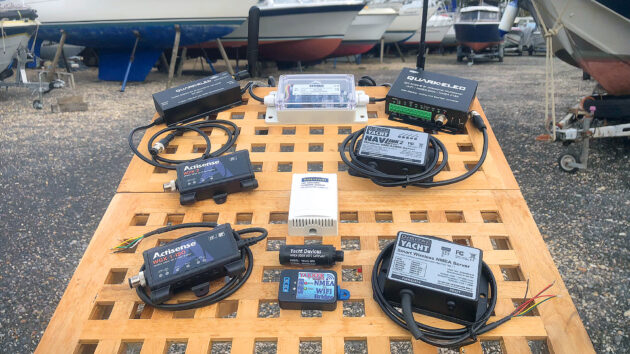
With modern tablets and smartphones becoming an increasingly popular choice for electronic navigation, we investigated the core of any onboard wifi network: the multiplexer wifi gateway.
This little box of tricks can receive NMEA data from most electronic navigation instruments and rebroadcast it wirelessly for use with wifi-enabled devices such as a tablet, phone or PC/laptop.
They can even allow you to send navigation commands such as waypoints and routes from your tablet or phone to your autopilot.
Network protocols
Electronic navigation instruments require a method to send information from their sensors (transducers) to one or more displays.
The older NMEA 0183 standard defined a format in which data is transmitted serially via ‘talker’ outputs and received via ‘listener’ inputs.
When all is working well, a NMEA 0183 ‘sentence’ will start with a special ‘delimiter’ character ($ mostly) and finish with a ‘linefeed’ character.
NMEA 0183 is asynchronous, meaning that in order for the listener to receive the data correctly it must be transmitted and received at a predetermined speed, known as the ‘baud rate’ (Bd).
The baud rate signifies the number of bits per second in the transmission and is usually between 4,800 and 38,400 for marine applications.
The main problem with NMEA 0183 is that it only allows communication from one device to many, rather than allowing numerous devices to converse simultaneously.
Raymarine originally overcame this with its SeaTalk 1 (ST 1) system that sent ASCII code over a single wire.
This proprietary protocol ensured only one device at a time could talk, but all could listen.
The coding is more complex than NMEA 0183 and transmission speed is slow (4,800 Bd), although multiplexers with suitable software can be used to convert ST 1 to NMEA 0183.
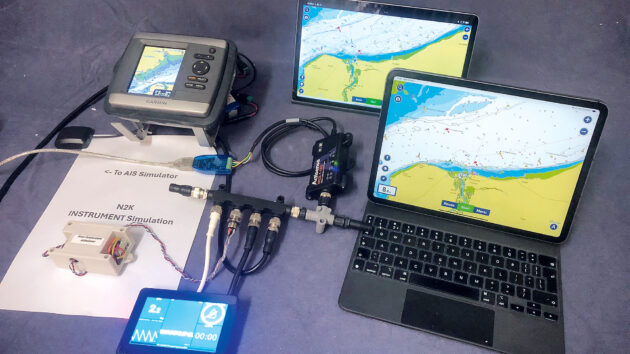
The devices were tested for ease of connectivity and signal strength. Photo by Dagnall Clutterbuck
To provide a faster and more modern ‘plug and play’ network, the NMEA 2000 specification was released at the turn of the millennium.
NMEA 2000 is electrically based on the automotive CANbus system, which uses two-wire signalling at the much faster rate of 250,000Bd.
NMEA 2000 devices connect to a data bus and power distribution network using a single, multi-core cable known as a ‘backbone’.
The main advantages of this system are simplicity of installation and speed of data transfer. Instruments and transducers simply plug into the backbone using a T-connector and universal drop cable.
Once recognised, devices are automatically detected by the system’s firmware and allocated an address on the network.
The high transmission speed means the signals can ‘reflect’ from the end of the cables and interfere with any following signals.
So, to prevent this from affecting reception, plugs (terminators) must be fitted at the extreme ends of the backbone.
In this system, any device can simultaneously converse with any other. Most sensors will broadcast data on the network for any device to use, but the standard also allows directed messages to a specific device address.
This can make installation and fault-finding much easier.
Typical NMEA 2000-compatible marine networks include Raymarine’s SeaTalk 2 and SeaTalk NG, Navico’s Simnet and Furuno’s CANbus system.
They differ from regular NMEA 2000 networks only in that they can have slightly different connectors and occasionally utilise proprietary messages to send special information to other products within their own family.
What is a wifi gateway for?
To use the information, we need a ‘gateway’ that allows our tablets/phones to see into the network data.
Available in several guises, the economy models usually only provide one or two unidirectional inputs and a single output format such as NMEA 0183.
These will collect data from one or more NMEA inputs and re-transmit them for a smart navigation app or multi-function display (MFD) to receive and display.
Something often not appreciated is that very few PC/tablet navigation programs will accept raw NMEA 2000 data, so the wifi gateways usually need to convert the messages into NMEA 0183 sentences for wireless transmission.
Multiplexing
All multiple-input wifi gateways have multiplexing abilities enabling them to receive and combine data from numerous instruments simultaneously, even at different baud rates, before retransmitting them in a single stream for further processing.
This usually requires the multiplexer to temporarily store received messages until they can be sent on.
Filtering with a wifi gateway
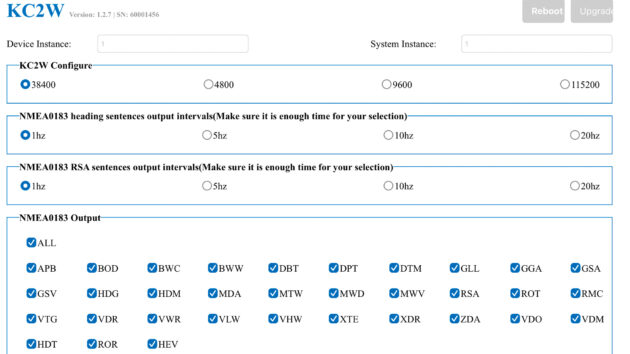
Filtering will make the device work more quickly. Photo by Duncan Kent
Most multiplexing wifi gateways offer a filtering facility in the setup software that enables the preselection of incoming data.
This allows unwanted or duplicated sentences to be filtered out, thereby speeding up the signal processing further, and in turn avoids the data bus becoming congested.
Wifi transmission
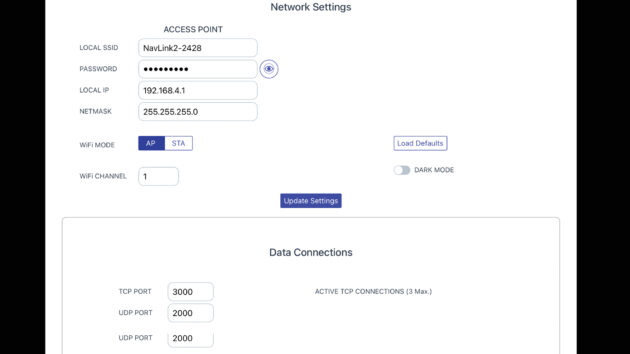
Logging into the access point will allow you to decide which smart devices will be able to access navigation data. Photo by Duncan Kent
Wifi-enabled gateways offer a direct wireless connection for one or more smart devices to access the navigation data after logging onto the gateway’s access point (AP).
Note, however, that when you are connected directly to a gateway’s AP, the same device cannot be connected to any other wifi source.
Connecting to an AP commonly disconnects the phone from the cellular network too, although most phones will ask afterwards if you want to use cellular data for internet access once they realise there is no internet in the wifi.
If you want to send commands such as waypoints and routes to an autopilot (bidirectional control) or want to be the only person receiving the navigation data, then you need to select the TCP connection.
If, however, you want to receive the data on multiple devices, you need to select the UDP option. Most navigation apps (though not all) tend to only send autopilot commands via TCP.
Alternatively, rather than the phone connecting to the wifi gateway, the latter can connect to an onboard router or a phone hotspot. This is called ‘Station’ or ‘Client’ Mode.
In Station mode, the wifi gateway will be allocated an IP address by the router, which will be needed later by any navigation app.
Any tablets or phones that now wish to get the data will need to connect to the hotspot/router.
An advantage of this configuration is that the number of UDP-connected devices allowed is no longer restricted by the number of devices that the wifi gateway can support in AP mode.
The Actisense and Onwa devices reopen the AP for connections after they connect using Station mode. With these devices it is possible to access them again via the AP, to discover what IP address the Station has allocated.
With others, finding the allocated IP can be more complex. However, once set up access to all the gateways via Station mode is really quite simple.
Password protection on your wifi gateway
All of the multiplexer wifi gateways tested required a password for wifi connection and all allowed the user to change this for security.
They also enabled the user to change the name of the device that will appear on the list of wifi devices on your phone/tablet.
Some devices then require a further administration password before they will allow settings to be changed via their web page configuration software.
Bidirectional devices
Rather than just receiving navigation data and sending it on to smart devices via wiring or wifi, there are times when you might need the process to be reversed, such as in the case of an autopilot, where you might want to send it a new GoTo waypoint or route.
Depending on the device you want to connect, you can use a NMEA 0183 output, SeaTalk 1 bidirectional, or NMEA 2000 for this control.
All the bidirectional devices we tested were able to accept ‘GoTo’ data sent from our test navigation program (OpenCPN) and to convert to NMEA 2000 (or SeaTalk1 in the case of the NMEA3WiFi).
Routing could also be used to simply send the 0183 GoTo messages to specific NMEA 0183 outputs.
We also confirmed that the NMEA 2000 devices were sent autopilot data (Nav data & XTE) and that the SeaTalk1 device was sent the equivalent SeaTalk1 messages.
Opto-isolation
All the devices tested, except for the Yakker, had opto-isolated ports.
These units contain an opto-isolation chip enabling the incoming NMEA 0183 signals to remain electrically isolated from the rest of the circuitry, thereby avoiding the risk of electrical feedback to a connected instrument.
Wifi gateway configuration
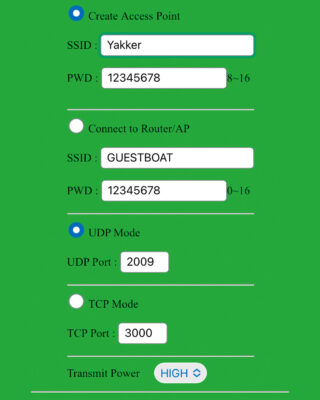
Many multiplexers have inbuilt web pages, making set up easy . Photo by Duncan Kent
Most of the multiplexers tested provided inbuilt web pages to make the initial setup easier.
Many also allow you to browse the page once you are connected to the gateway’s Access Point (AP), to enable other settings, password changes and features such as data monitoring for troubleshooting or log recording.
Quark uses a PC program for setup, for which a PC and USB connection are required.
Debugging and web gauges
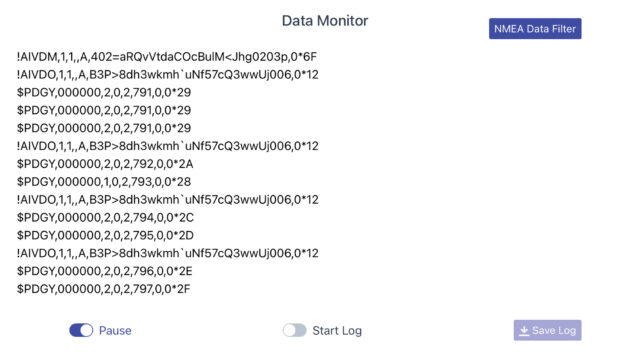
A data monitor will allow you to monitor the data being transmitted to the device. Photo by Duncan Kent
Most of the wifi gateways provide simple web page-based displays that allow the user to monitor the data that is being seen by the device. These usually show the type of message being received and its data.
The NMEA3WiFi also has an ‘experimental’ page that can show simple digital displays of some data, but it is not user-programmable.
The more sophisticated NMEA 2000 devices, such as the Yacht Devices and Actisense products, can also show many pages of interactive analogue gauges.
These can be configured by the user, for example to show engine rpm or oil pressure, and can provide a useful backup or extra instrumentation on the phone.
Although we didn’t test it, the Yacht Devices ‘Web Gauges’ feature includes switches that can, for example, switch lights on (if they are NMEA 2000 switched) or send commands to autopilots.
Yacht Devices YDWG-02 wifi gateway (NMEA 2000 only)
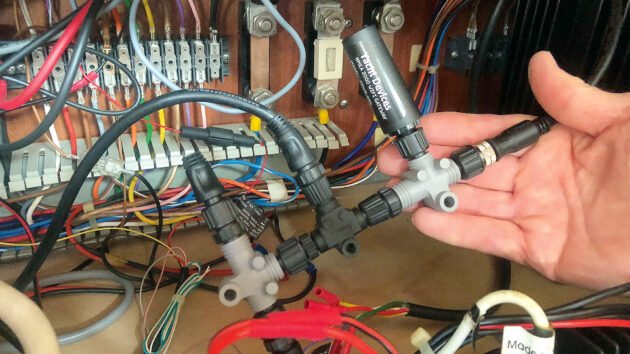
The Yacht Devices YDWG-02 is easy to add to a NMEA 2000 network. Photo by Dagnall Clutterbuck
Price: £210
The very small and neatly packaged YDWG-02 gateway plugs into a NMEA 2000 network via an integral M12 plug.
This connects it directly to a PC, tablet or smartphone via wifi alone, although other versions providing alternative connectors are available.
The YDWaG-02 contains a bi-directional converter between NMEA 2000 and NMEA 0183 protocols, so it is compatible with virtually all marine navigation applications, including PC, iOS and Android software.
To configure the gateway, a wifi-enabled device with a web browser is needed.
It supports TCP (wifi connection protocol for single devices) and UDP (multiway wifi connection protocol) internet protocols and operates as a wifi access point (AP). Alternatively, it can be connected to an existing wifi router/network, although the AP will then be switched off.
It is also possible to browse the real-time vessel data on customisable, web-based gauges and data logs. Also, if you have an Internet connection, it can automatically upload the recorded data to a Yacht Devices Cloud server.
Diagnostic software is included for use on Microsoft Windows, Mac OS X and Linux operating systems, and it can also be paired with Yacht Devices’ NMEA 0183 device to remotely connect NMEA 0183 devices to NMEA 2000.
Actisense W2K-2 wifi gateway (NMEA 2000 only)
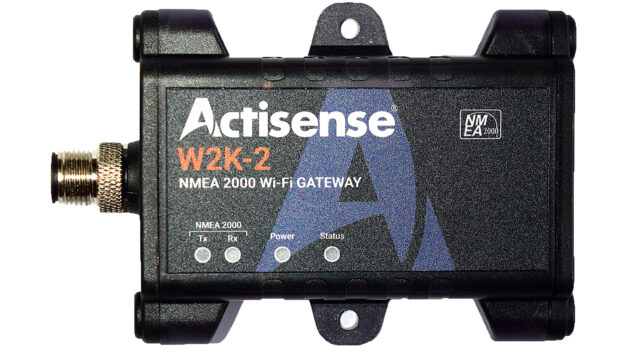
The Actisense W2K-2 has low power consumption. Photo by Dagnall Clutterbuck
Price: £189
Superseding the original W2K-1, this gateway provides NMEA 2000 message conversion into NMEA 0183 sentences and vice versa, via wifi.
Supporting both TCP and UDP protocols, it streams data using up to three separate data servers. It can either function as a direct access point, as a client off a router or both simultaneously.
In addition to the standard SSID/password for wifi, each Actisense device requires a separate user ID and password before any key settings can be changed.
Received data can be logged onto an internal microSD card (<128Gb) for later analysis or logbook recording. The Actisense-i diagnostic toolbox is also included as standard to aid troubleshooting.
Actisense gateways are housed in rugged, IP67-rated casings, making them ideally suited to marine installation in exposed locations.
The W2K-2 has a discrete internal antenna, four LED status indicators and a single male NMEA 2000 connector. It also has low power consumption of 2-LEN (100mA).
Digital Yacht NavLink2 wifi gateway (NMEA 2000 only)
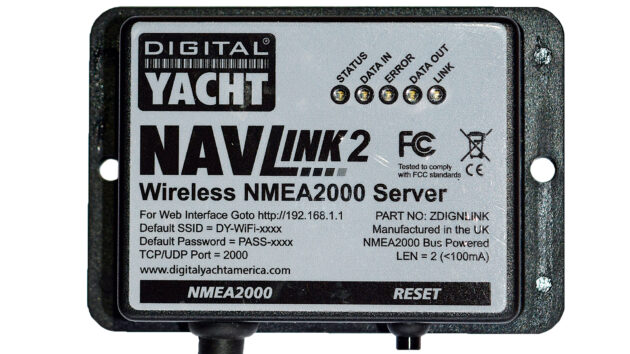
The Nav2Link is an easy to fit NMEA2000 to wifi server. Photo by Duncan Kent
Price: £216
NavLink 2 is Digital Yacht’s NMEA 2000 to wifi server designed to provide navigation data wirelessly for all the most popular smartphones, tablets, iPads and PC applications.
It simultaneously supports both UDP (for multiple connections) and up to three TCP/IP (single device) interfaces.
The latest model of NavLink 2 is now configured through its own simple web interface using any regular browser. Settings allow the user to change the network name and password or merge the wifi into an existing network.
You can also filter out unwanted or repetitive NMEA sentences to speed up data transfer.
A viewer, to monitor and log received NMEA data, is included in the web browser for easy fault finding and uses internal storage memory.
In addition to converting NMEA 2000 to 0183, the device can also send and receive raw NMEA 2000 data where required.
The front panel has five LEDs indicating power status, data flow in/out, error warning and web link status.
However, not untypically, the plastic casing is not waterproof (IP54), so it should be installed in a dry location.
Actisense WGX-1-ISO wifi gateway (NMEA 2000 only)
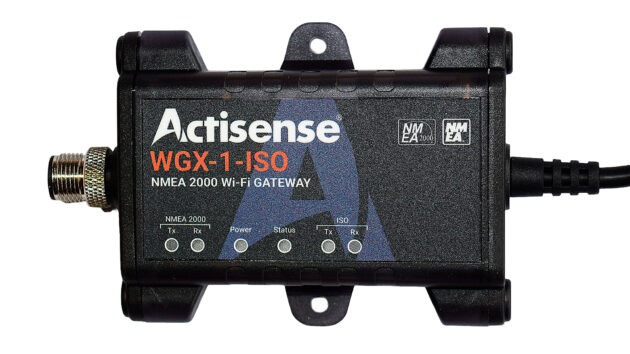
The Actisense WGX-1-ISO can integrate with most popular navigation apps. Photo by Duncan Kent
Price: £239
The WGX-1-ISO adds a NMEA 0183 input and output to a NMEA 2000 wifi gateway, similar to the Actisense W2K-2.
Capable of bidirectional conversion and with routing and filtering options, it supports both UDP and TCP data streaming, making it simple to integrate with the most popular navigation apps.
Configuration is via a web page, which offers a rich variety of routing and filtering options and, as with the W2K-2, it requires a separate user ID and password to enable key settings to be changed.
Navigation data received by the unit can be logged onto an internal microSD card (<128Gb) for later analysis or logbook recording, and the Actisense-i diagnostic toolbox is also included as standard to simplify troubleshooting.
Similar to the W2K-2, the casing has a standard male connector for NMEA 2000 connection.
However, in addition the WGX-1 also features a serial/NMEA 0183 cable with bare wires.
As with the W2K-2, there are four useful LED indicators on the front for power and status, plus two more for data in/out indication.
Onwa KC-2W wifi gateway (NMEA 2000 only)
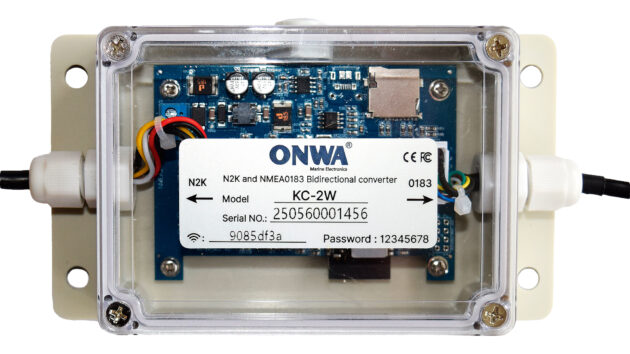
The Onwa KC-2W has no monitor or logging features. Photo by Duncan Kent
Price: £135
A straightforward, bi-directional gateway in one of the largest boxes of the tested units, the KC-2W will convert NMEA 0183 signals to NMEA 2000 and vice versa.
It comes with a flying NMEA 2000-compatible M12 male plug on a lead, plus a cable with bare wires for NMEA 0183 connection. There is also a cable entry with gland for connection to the CAN port inside.
The KC-2W offers wifi connection to both NMEA 2000 and NMEA 0183 data for use with navigation apps on smart phones, tablets and PCs.
Set to a NMEA 0183 baud rate of 38,400 (AIS) as default, this can be easily changed via the rather rudimentary web browser configuration page, which also allows filters to be applied where needed.
There are no monitor or logging features, however.
The casing, though large, is ruggedly built and splashproof, and two LED status indicators can be clearly seen on the circuit board inside through the see-through lid.
Quark-Elec A032 wifi gateway (NMEA 2000 only)
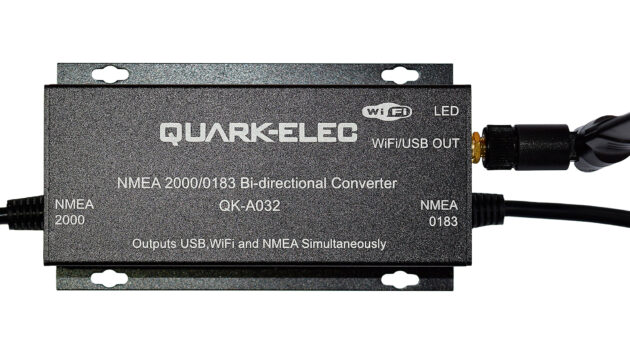
The Quark-Elec A032 is a bi-directional NMEA 0183 to NMEA 2000 gateway. Photo by Duncan Kent
Price: £134
Quark-Elec supplies a wide range of gateways and multiplexers from the basic NMEA converter to a fully spec’d wifi gateway/multiplexer with built-in AIS and GPS receivers. They are easily distinguished by their rugged metal
cases and somewhat ungainly external wifi antenna.
The QK-A032 is a bi-directional NMEA 0183 to NMEA 2000 gateway with a pair of wired input/outputs plus a wifi output (TCP only).
The A032 also has a micro-USB socket for PC connection and three LED indicators for power and data.
Both Quark devices tested were unique in requiring a dedicated program to be used to connect them to a Windows-based PC (via USB) for setup, which is a little limiting and requires the correct driver to be downloaded if you have any operating system other than Windows 10.
Once connected, the baud rate, routing and other settings are configurable through the setup software as usual.
Wireless connection is made between a nav app and the gateway via ‘ad hoc’ (peer-to-peer mode) or by connecting the gateway via an onboard wireless router (Station mode).
Quark Elec QK-A034-B wifi gateway
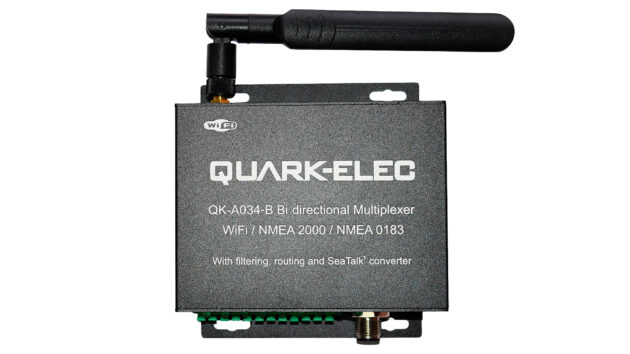
The QK-A034_B is feature-rich with bidirectional, multiplexing gateways. Photo by Duncan Kent
Price: £240
One of Quark’s more comprehensively featured, bidirectional, multiplexing wifi gateways, the A034-B provides three NMEA 0183 inputs, one SeaTalk 1 port, a single NMEA 0183 output and a NMEA 2000 connection. It also has a two-way USB port that allows the same bidirectional flexibility from a PC.
The internal SeaTalk 1 converter allows the A034-B to listen on the SeaTalk 1 bus and convert the data to NMEA 0183, which in turn is converted to NMEA 2000 parameter group numbers (PGNs).
As with the A032, setup and configuration are carried out on a Windows PC connected via the USB port. The software includes filtering and monitoring capabilities for bandwidth reduction and troubleshooting.
In addition, a routing facility allows specific outputs to be designated to a particular function if required, to help reduce data overflow.
The A034-B is unusual in that the wired connections all use a push-type connector. This works best with wires that have ferrule terminations, as bare conductor wires tend to bend and deform when pushed into the connector.
Each data port has its own LED confirming data flow, plus a further four LEDs to indicate errors, power, wifi and USB connections.
Yakbitz Yakker wifi gateway (NMEA 0183 only)
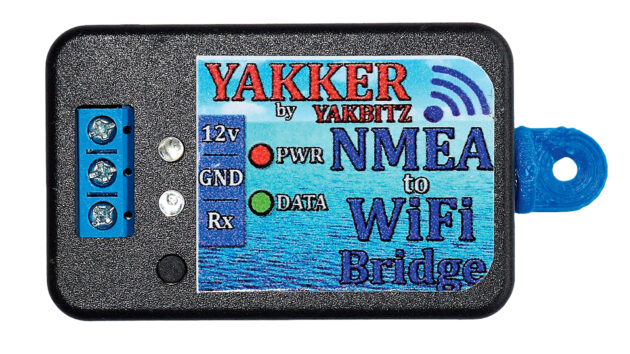
The Yakker can only support single or multiple devices, not both. Photo by Duncan Kent
Price: £79.50
Australian manufacturer Yakbitz produces a range of seven low-cost data converters covering almost all the needs of a leisure boat owner wishing to use a smartphone or tablet for navigation.
Modules include this very small (55mm x 35mm) single-input, hard-wired NMEA 0183 to wifi device for those with simple needs such as importing AIS targets into a navigation app.
The device creates a hotspot to connect wirelessly and a basic configuration (name, password, TCP/UDP, baud rate and transmit power) is accessed using a simple web browser page.
Surprisingly, it also has a data viewer and the ability to filter out unwanted sentences to help speed up processing.
This was the only device tested not to include opto-coupling, however, and also only supported either UDP or TCP protocols, not both simultaneously.
Other devices available include a 1-port bidirectional 0183/wifi or SeaTalk/wifi converter, a 2-input NMEA 0183 model, and a 3-port 0183 multiplexer with USB.
The tiny box has a row of three screw terminals (power +/- and data in) and two LED indicators for power and data flow.
Digital Yacht WLN10 Smart wifi gateway (NMEA 0183 only)
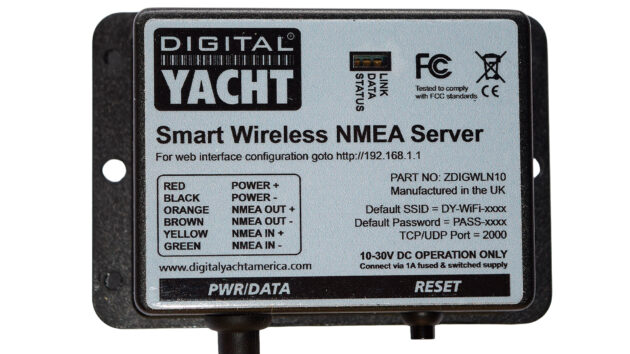
The WLN10 Smart can support single and multiple devices. Photo by Duncan Kent
Price: £180
Digital Yacht offers a wide range of useful interfacing products, the WLN10 Smart being its lowest price NMEA 0183 to wifi gateway.
It provides one input and one output only, so is suitable for connecting something simple like an AIS receiver to a tablet chartplotter.
Like almost all tested devices other than the Quark-elec units, this latest ‘Smart’ version is now configurable through a simple web interface, via a standard web browser.
Settings not only allow the user to change the network name and password but also filter out unwanted or repetitive NMEA sentences or merge the wifi onto an existing network.
A viewer to monitor and log received NMEA data using internal device storage is also included in the web browser, to simplify fault-finding.
The WLN10 simultaneously supports both UDP (for multiple connections) and up to three TCP/IP (single device) interfaces.
For those requiring more inputs, the DY WLN30 Smart Multiplexer version is very similar but provides a total of three NMEA 0183 inputs. It, too, is priced under £250.
Vela-Navega NMEA3WIFI
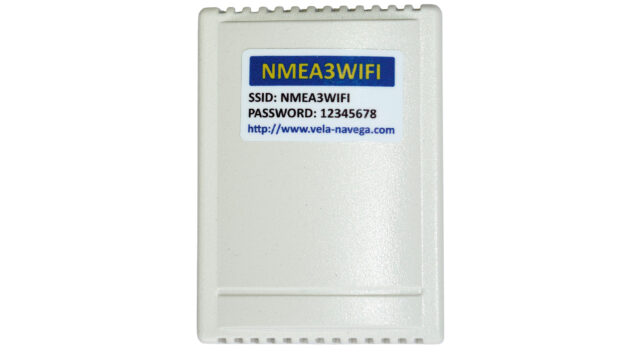
A SeaTalk 1 output is provided as standard on the Vela-Navega NMEA3WiFi. Photo by Duncan Kent
Price: €64
Made in Portugal, this low-cost, compact wifi multiplexer allows straightforward connection between NMEA 0183 or SeaTalk 1 instruments and most smart wireless devices such as phones, tablets, PCs and chartplotters.
It has two opto-isolated NMEA 0183 inputs and one NMEA 0183 output, as well as a bidirectional SeaTalk 1 port.
SeaTalk 1 data is converted to NMEA 0183 sentences, whilst in reverse NMEA 0183 data can be converted to SeaTalk 1 datagrams, for sending on to a SeaTalk 1 bus.
This was the only device on test that provided a SeaTalk 1 output without requiring extra hardware.
As with other devices on test with multiple inputs, the routing of the input data streams (2 x NMEA 0183, 2 x wifi and 1 x SeaTalk 1) to the output streams (1 x NMEA 0183, 2 x wifi and 1 x SeaTalk 1) can be set by the user using a webpage.
Filtering is possible on NMEA 0183 and SeaTalk 1 outputs. The multiplexer can also be used to view and analyse the data on the 0183 or SeaTalk 1 bus for troubleshooting.
Wifi communication supports both UDP and TCP Internet protocols and the device has a unique simulation mode accessed by simply powering it up via a USB cable.
Users are recommended to use this function before installing to become acquainted with the wifi gateway’s features.
Testing a wifi gateway
We tested each multiplexer by first determining how easily our phone/tablet connect to it.
With the phone connected to the device’s Access Point (AP), we looked at the wifi settings to see if the router was set to the ‘null’ address 0.0.0.0, as this can assist with apps that connect to the internet (eg for weather).
With iOS devices, we noted that even when the app did not set this address, the phone usually interrupted the app and asked if it could use cellular data for internet access.
With the multiplexers that set the ‘null’ router, the process was seamless with no interruptions, but results may vary depending on the phone operating system.
An alternative configuration would be to use the Station (aka Client) mode and configure the wifi gateway to the phone hotspot.
We tested this and found that some multiplexers will support connections to their AP while also connecting to hotspots (AP+STA in table, previous page), and this can be helpful as it allows checking of the IP that the device has been allocated.
We used a simple NMEA 2000 instrument simulator to send virtual wind, water depth and boat speed data and checked that it was correctly seen and sent to the app.
Then we used a PC with a serial output to send a set of AIS targets to the multiplexer’s serial input at 38,400 baud.
This simulates one of these devices’ most popular applications, where an inexpensive AIS receiver may be added to a NMEA 2000 instrument network.
Finally, we sent a waypoint as a ‘GoTo’ to the multiplexer from our test navigation apps (OpenCPN, QtVlm & iNavX) to see which devices would accept these messages and convert them into suitable commands to allow an autopilot to be set to Track mode. These should also show range and bearing to the waypoint.
The Actisense and Digital Yacht devices, plus the Quark A034 and Yacht Devices YDWG, all sent the correct autopilot commands (PGN 129283 & 129284) to the N2K network.
This should be adequate for an autopilot to be able to set track mode. Few, however, sent the waypoint name (PGN129285). Neither the Quark A032 nor the Onwa KC-2W sent any NMEA 2000 autopilot commands.
Signal strength with a wifi gateway
Since some of the units had a small internal antenna and others an impressive external antenna, we tried to see if we could detect any difference in wifi signal strength by checking it through a brick wall.
The signal strength varied considerably depending on the relative orientation of the device and our receiver.
These tests showed that the small Yacht Devices WG-02 produced a weaker signal than the others.
However, once initially connected within a 5m range, we were able to remain up to 25m away in open space.
Surprisingly, the larger antennae of the Quark devices didn’t seem to produce notably stronger signals than the others.
We would expect that, within the confines of a small to medium-sized leisure boat, all the devices we tested should work well providing their RF (radio frequency) signals are not obscured.
To illustrate how easy it is to add one of the NMEA 2000 devices to a NMEA 2000 network, we tried fitting both the Actisense W2K-2 and Yacht Devices WG-02N to an existing system.
It was simple to find the NMEA 2000 backbone wiring on our test boat as it was loose behind the instruments, so we were easily able to add a T-piece, drop cable (where needed) and the wifi gateway.
The small size of the Yacht Devices WG-02N made it particularly easy to add. The Actisense W2K-2 would normally be used with a short drop cable, but can also be fitted without, although the orientation of its standard
M12 plug resulted in it being twisted in comparison to the other backbone components.
What we learned in our wifi gateway test
While all the devices worked as advertised and will make your boat’s instrument data available over wifi, some were notable for their additional features.
In particular, the Yacht Devices and Actisense gateways impressed us with their sophisticated web interfaces and user-configurable analogue displays.
The Actisense displays were particularly good looking on a PC screen, but reorganised awkwardly on a phone, giving the Yacht Devices WG-02N the edge.
Want more wifi gateway tests?

A subscription to Practical Boat Owner magazine costs around 40% less than the cover price.
Print and digital editions are available through Magazines Direct – where you can also find the latest deals.
PBO is packed with information to help you get the most from boat ownership – whether sail or power.
-
-
-
- Take your DIY skills to the next level with trusted advice on boat maintenance and repairs
- Impartial, in-depth gear reviews
- Practical cruising tips for making the most of your time afloat
-
-
Follow us on Facebook, Instagram, TikTok and Twitter