


Rob Melotti investigates how to set up your chartplotter to get the most out of it, and common pitfalls to steer clear of.
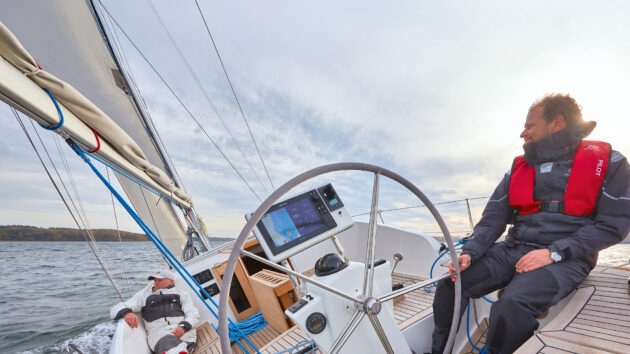
How often do you stop and really sit down with your chartplotter?
Navigators are necessarily tunnel visioned once under way: they’re only interested in where they are and where they are going.
But once the boat is safely alongside, the bigger questions get a look in. You start wondering, shouldn’t there be a way of getting the chartplotter to do that bit? Surely I can get that instrument to talk to this one and put the right number on the screen?
In short: am I getting the most out of the chartplotter on my boat?
The answer is far from simple: if you currently use a matrix of published charts and instructions, instrument screens, chart displays, apps and hand-written notes to navigate safely, it may be possible to upgrade, combine or replace certain elements to become more efficient, to increase the amount of time between nav tasks without compromising on safety.
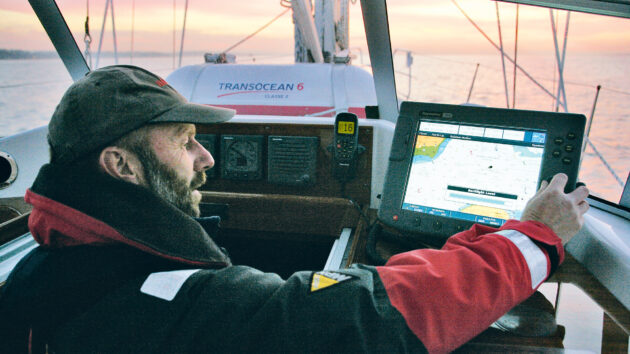
Monitor your speed over ground (SOG) otherwise you might not notice strong tidal currents. Photo: Graham Snook.
But the nagging worry is that as chartplotters become more and more capable at maritime navigation, they can become more difficult to use.
In addition, as ‘stare at the screen’ pilotage becomes easier and easier, the worry is that newcomers to boating will no longer consider studying traditional navigation to be much of a priority.
So what’s the best way forward?
I spoke to a few experts to find out. As expected, the response focused on the continued necessity for navigational knowledge, but the way to overcome the complexity of it was a little more playful than I expected.
GPS basics: accuracy and backup
It’s worth starting at the beginning to illustrate how a lack of basic maritime nav knowledge can leave you severely exposed to hazards even when using the most advanced electronics.
When GPS first became available for leisure users in the 1990s, the receivers were capable of three main tasks: finding your current location, saving a series of other locations in the memory (waypoints), and linking them together into routes.
Navigation, for the most part, still relies on these three elements. Yet the screen displaying these basics has changed beyond all recognition in the past 20 years – first becoming a chart, then becoming a multifunction display.
These changes present problems as well as opportunities.
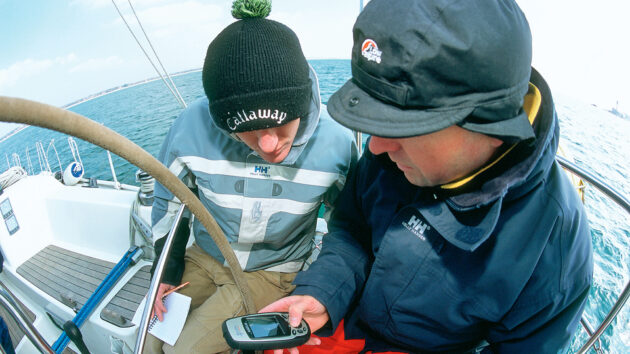
Always have a backup GPS. Photo: Graham Snook.
Rule No. 1: Know where you are
Geodetic Datum is essential – the default system is WGS84, but users can adjust their chartplotters to different geodetic systems.
The important thing is that your charts (paper or digital) have the same datum as your GPS receiver. If the two systems don’t match, your GPS position could well be inaccurate.
Nick Heyes, the founder of Digital Yacht, has a lot to say on the subject of GPS accuracy: “The single most important element of your MFD (multifunction display) is the GPS signal. There is little point in having all the rest of the bells and whistles up and running if you simply don’t know your current location.”
He points out that users should be acquainted with the satellite constellations that they are relying on and, at the very least, understand what horizontal dilution of precision (HDOP) means.
Put briefly, a low HDOP (1-2) is an indicator of the greatest positional accuracy, while a figure of 10 or more indicates that the satellites your machine can receive are poorly distributed for performing accurate triangulation and should therefore not be relied upon.
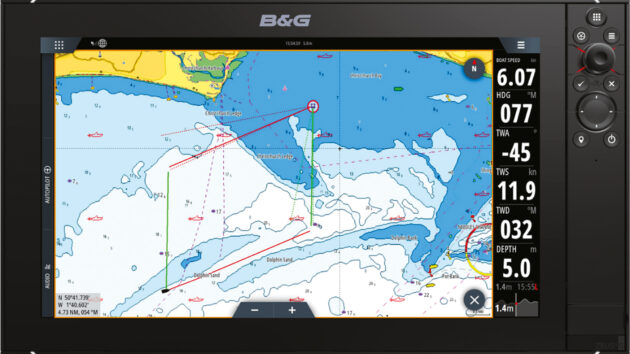
Make sure your chartplotter has a low horizontal dilution of precision (HDOP) to ensure your position on the screen is accurate. Photo: Graham Snook.
The risk of GPS failure
Complete GPS failure, such as a spoofing attack, a signal jamming issue, or more likely a power failure on board that can switch your screens and receivers off, is still the biggest ‘existential’ navigation issue to consider.
RYA training is now administered as ‘digital first’, which means that the first priority for an instructor is teaching students the best navigational practice where possible on screen rather than using traditional methods.
So the first fallback should be a battery-powered GPS system or handheld device with a separate GPS receiver. Assisted GPS (A-GPS) is the system most mobile phones use for location services, which will only work within range of a mobile phone tower.
Bear in mind too, that laptop plotters cost very little and can work with a huge range of chart providers and in many countries (such as NZ and USA), charts are available free of charge.
However, there is still time for traditional chartwork on most cruising courses, so making a comprehensive passage and pilotage plan, attending to a written log and jotting down bearings and weather forecasts is still essential practice.
Having a VHF radio license will also provide more communication options than just relying on a mobile phone.
Protect yourself from GPS spoofing
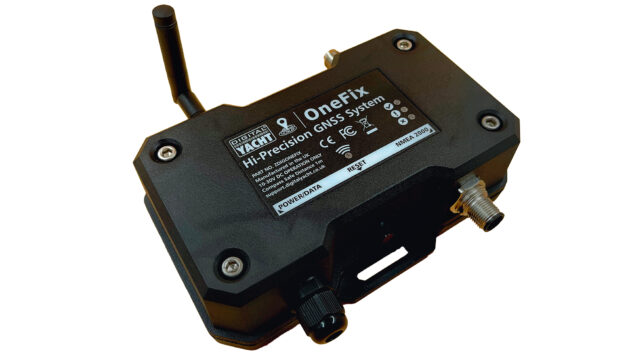
Digital Yacht’s new OneFix GPS Sensor. Photo: Digital Yacht.
Digital Yacht launched its brand new GPS receiver Onefix (£390) at Southampton Boat Show in September 2025.
It receives signals from as many different constellations as possible, while also double-checking every signal with signals from similar satellites in order to bypass so-called ‘spoofing’ attacks.
Spoofing is when hackers hijack a bandwidth, such as the connection between a satellite and your GPS receiver, and override the usable data with either misleading information or simply nonsense information.
Both outcomes are potentially dangerous and little understood in the marine world.
Cover your basics
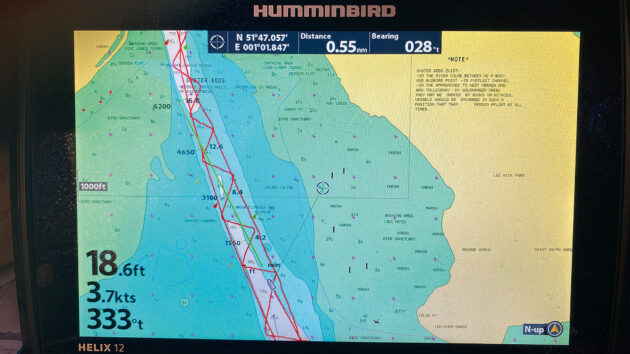
Always keep your charts up to date; do this in port rather than waiting til you are out to sea to guarantee internet connectivity. Photo:
The first iteration of the chartplotter is reportedly as early as 1995, but by 2005 they were available from a variety of suppliers. Featuring small screens surrounded by buttons at first, they have now evolved to much larger touchscreens or even a mixture of the two.
Chart updates were performed by inserting SD cards; input from onboard instruments was often bespoke within manufacturers’ own ecosystems, but became more and more standard thanks to NMEA0183.
The evolution of NMEA2000 improved connectivity and has turned the majority of chartplotters into multifunction displays (MFDs) capable of ingesting and processing data from any manufacturer’s boat-speed sensors, depth, windspeed, AIS sensors and more.
So what could go wrong, and how do we set these devices up to get the most out of them?
The Volvo Ocean Race: A chartplotter case study
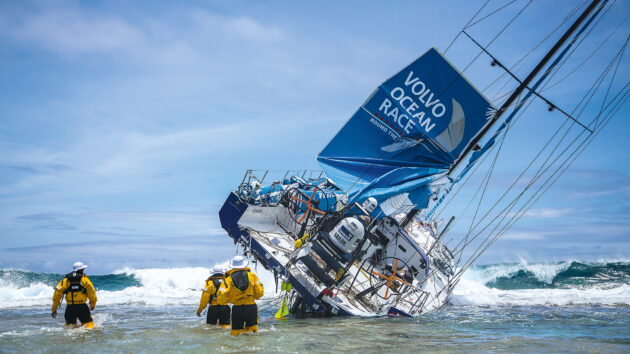
Team Vestas Wind hit a reef after navigator Wouter Verbraak failed to zoom back in on the chart, so he missed the hazard. Photo: Brian Carlin/Team Vestas Wind/Volvo Ocean Race.
The most famous chartplotter-related incident took place aboard Team Vestas Wind during the 2014-15 Volvo Ocean Race when professional navigator Wouter Verbraak was lulled into a false sense of security by the vector chart on his state-of-the-art chartplotter screen.
Put simply, he zoomed out to see the boat’s overall progress across the vast Indian Ocean and neglected to zoom back in to ensure that the automatic screen decluttering system hadn’t concealed something important, like the unlit reef that the yacht ploughed into under full sail.
Thankfully, nobody was hurt, but the lesson is clear for all who go to sea: beware the zoom button (or pinch-to-zoom gesture on touchscreen).
Revealing and concealing detail on the chart is essential for the zoom to function and be usable, but if it could happen to a professional navigator in the open ocean, it could happen to you in Poole Harbour!
Chartplotter dos and don’ts
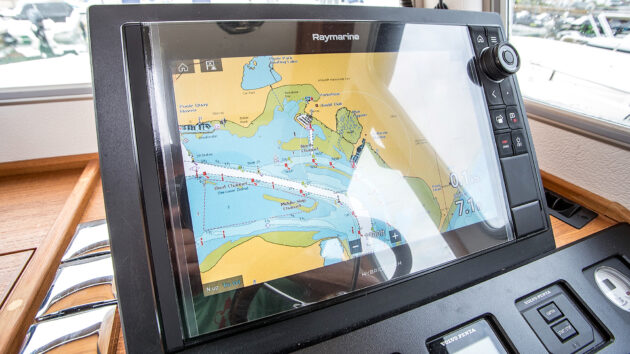
Double check the colour coding on digital charts so you know exactly what they mean; not all charts use the same colour palette. Photo: Richard Langdon.
The positioning of waypoints directly on top of large fixed nav markers, such as posts or lit buoys, is also asking for trouble.
We will touch on autoroute and autopilot later, but as the technology gets smarter and smarter, building in an offset from a navigation mark is essential.
Additionally, if you’re using a paper chart alongside a digital chart, it pays to ensure you truly comprehend the colour coding on both sources.
Imray raster and paper charts, for example, use similar colours to Admiralty charts, but the meaning behind the colours is completely different.
I mentioned the depth vs draught problem earlier, but depth information on vector charts can usually be revealed or concealed in a deliberate, controlled manner as well: you, the skipper, can probably elect to remove charted depths below a certain figure, for example.
This helps to remove clutter from the screen by omitting any soundings greater than 15m, for example, none of which affect most recreational boaters.
Powerboaters might be even more radical with their depth data clean-up since they usually draw less water than yachts.
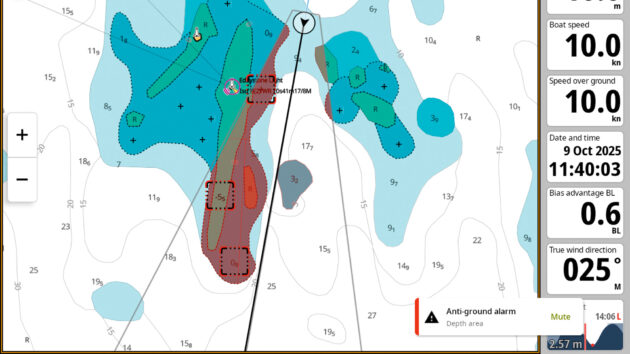
A screen message and audio alarm (if not muted) alert to approaching depth hazards.
Again, it’s worth double-checking the colour coding on the digital charts, because these colours can do a lot of the work for you. Often, contour lines below a certain depth can also be hidden.
Your own boat’s depth gauge can and probably should be available to view as large as possible on every single screen layout the chartplotter can produce. But opinions vary on what other details should be viewable at all times.
“The MFD screen can be set up by the user to include as much or as little data as you like,” says RYA Yachtmaster instructor trainer Andy Wright.
“But for example, why have the time on your chartplotter screen when the lovely brass clock on your bulkhead tells the time beautifully? Do you need your heading (HDG) and COG (course over ground) as well as the HDG and COG vectors [arrows] coming out of your boat on the screen? Is the LAT and LONG necessary when they’re displayed on your VHF screen?
Often, we’re doubling up, and this is becoming a distraction. Experiment with the settings, but really challenge each additional piece of information you’re receiving and challenge yourself on whether it enhances your navigational safety or not.”
North up vs Head up
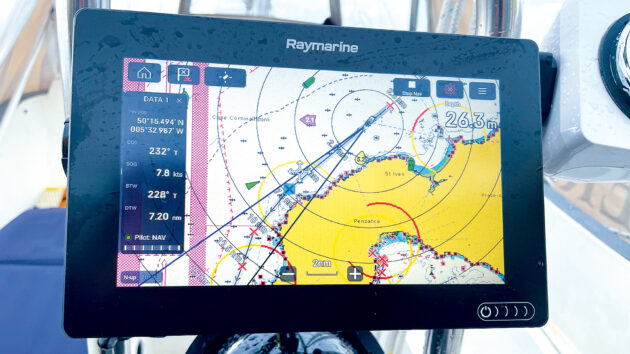
Cross-referencing is easier if your plotter is in the North Up orientation mode, especially if you’re used to paper charts. Photo: Kerry Buchanan.
This is a fundamental decision for any navigator, and if you can’t stand one setting, try the other.
Those used to paper charts will tend to stick with North Up orientation so that cross-referencing is easy and so that the screen stays still while the boat moves as it changes direction.
However, Head Up mode can be extremely useful for navigating winding creeks or channels that double back on themselves because, of course, determining left and right is more intuitive.
Navigating the machine
As machines increase their capabilities, they become increasingly complicated for the users. When navigating, the chartplotter’s navigation tool becomes more difficult than simply navigating the sailing area… something’s gone wrong!
But there is a solution, of sorts.
I contacted David Cusworth at Savvy Navvy to discuss this issue, because although mobile phone and iPad apps differ in many ways from the software built into an MFD, apps like Savvy Navvy have iterated rapidly and can discuss the evolution as a whole.
“We do lots and lots of research with our users, asking: ‘Intuitively, where do you think you would find this feature?’ because what we believe is intuitive is not always what the user thinks is intuitive, and it doesn’t really matter what we think, it’s what the user thinks. So if we see that they’re all going to one particular place to look for something and it’s not there, then we’ll do more research and maybe we’ll move it there.”
I also reached out to Ben Meakins, former PBO deputy editor, now a product test manager for B&G, who gave me a demonstration of the latest Zeus SR system.
“We have a lot of validators that use the new kit in development and give the designers and testers feedback. I manage a small fleet of people who use it, and let me know what they think. I try not to give them too much information to try and let them puzzle it out and see how they get on, to see how intuitive it is.”
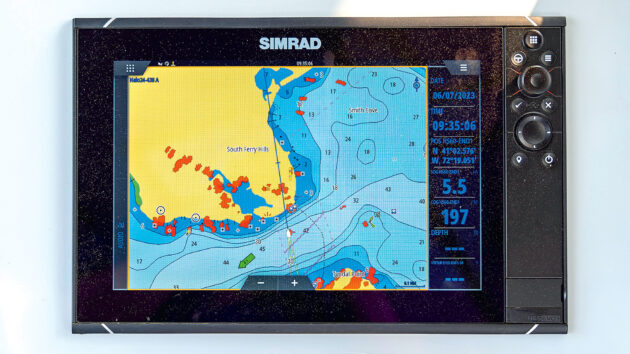
Do you really need all of the data on display on your chartplotter screen? Photo: Gavin Zeigler/Alamy.
He gives an example that harks all the way back to the very earliest days of GPS and continues to create difficulties to this day – the Nav button:
“It was initially quite hard to figure out how to cancel your active route. You had to tap on the screen and find the stop setting in the menu. So because of that feedback, we now have a [Nav] button where you have all the data you might want to see, including a prominent stop button, all the legs of the route and the waypoints etc.”
But for me, there is a more fundamental point: once all the research, feedback and development have been completed, this screen lands in my lap, leaving me with one essential question:
How do I navigate the machine that is supposed to be my navigation aide?
Ben Meakins talks up the advantages of the most modern designs with a small measure of context at the end: “In the previous generation of MFDs, such as the B&G Vulcan… in order to change any settings, you’d have to navigate all the way out of the chart and back to the home screen, then navigate to the settings page and then to the chart menu.
“This new architecture [on the Zeus SR] is designed to make everything just one button press away. Some familiarisation is needed, as with any product, but we have tried to simplify this as much as possible.”
Own boat tuition can be a great place to start, and I decided to reach out to Solent Boat Training for exactly this reason: Sam Noble is an experienced Yachtmaster instructor – power and sail – who has run his own boat management company, which entailed numerous tuition sessions with owners of all stripes.
The interesting aspect of what he said wasn’t about the specifics, but the general approach. As well as practice and training, today’s digital instructors urge you to go away and play.
“The RYA have got a good push on Digital First now. If you’d gone back five years, 70% of navigational training in the RYA scheme was with proper chartwork. We’ve pretty much flipped that on its head,” he tells me.
“The problem is, that while they’ve pushed it over the last three to five years, we’ve all been doing it for years and years and years, so really this is the transition; we’ve got the go-ahead now so we can say ‘Look at this; this is how I’ve been doing this; look at how the rolling road’s improved, let’s change the parameters of what’s acceptable depending on what course you’re going on or where your trip takes you. Let’s have a look at sonars and how much more we can get out of a sonar.
“All that kind of useful stuff that we were playing with, we’d just say ‘have a look at this and when you get on your own boat play with it a bit more’; We’re now saying: ‘Let’s play with that here’.”
Autorouting features: the boats that sail themselves
In the last 10 years, a series of enhancements across the industry has seen new levels of capability and performance. Ethernet and NMEA OneNet are now commonly integrated into onboard networks to incorporate high-bandwidth data streams such as broadband radar, high-definition sonar and camera feeds.
Internet-enabled multifunction displays are now able to transfer waypoints, routes and other data from handheld devices at home to the boat’s fixed chartplotter, thanks to secure cloud data storage. Not to mention chart and other software updates.
The most recent evolution is the auto-routing feature.
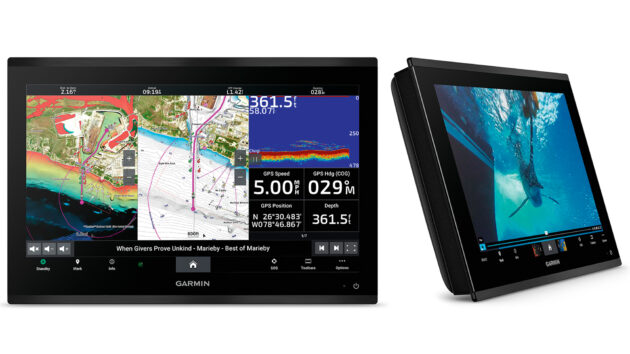
Many chartplotters, like Garmin’s GPSMAP 9000 have auto-route. This is a handy function, but always review the route. Photo: Garmin.
Ben Meakins illustrates the auto-route capability in its simplest form as an amazing aide to planning.
His desktop simulator had the yacht positioned off the Eddystone Lighthouse to the south-west of Plymouth and within 10 seconds he had zoomed out, tapped a point in the Bristol Channel, selected autoroute and come up with a useful estimate of how long it would actually take to sail at 5 knots around Land’s End to reach that point, including a complete set of waypoints taking into account upwind legs, Traffic Separation schemes and tidal data for a set depth of keel.
“It’s a fantastic bit of kit,” says Solent Boat Training chief instructor Sam Noble, “And what we’re having to do is make sure that people review the route […] Because 90% of the time when I show people autoroute (and I do) it does something that I wouldn’t expect. […] Our Rodman, for instance, has got all the latest and greatest Raymarine […] and apart from taking the boat off the pontoon, if I wanted to, I could set an autoroute and then pull off the pontoon and say: ‘OK. Take me there.’ And theoretically, it will take me there.”
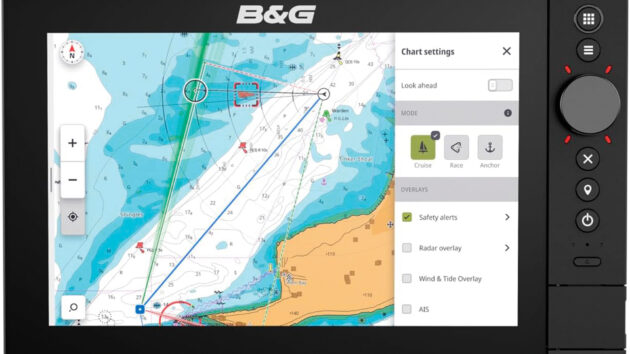
Proceed with caution: here B&G’s safety alerts feature is highlighting a dangerous sandbank,
but note that settings menus can obscure the chart and data when opened so try to do all setup before leaving the mooring. Photo: B&G.
The B&G Zeus SR now also features anchor mode, which shows depths at low water and colour codes your track to show where it’s safe to anchor, plus anti-grounding safety alerts that scan ahead of the boat and alert you to any upcoming hazards when under way.
This scanning system has a ‘harbour’ mode that ignores objects beyond a certain distance and an ‘offshore’ mode that looks well ahead in your current direction.
High-resolution radar, sonar and camera feeds may feel like unnecessary power draw for some boat owners, but MFDs for fishing are extraordinarily effective hunting devices.
The radar can detect flocks of seabirds that are gathering where the fish have schooled together; the sonar can then detect the school beneath the surface, while temperature sensors can also pick out specific spots attractive to certain species.
Autopilot can be engaged to make the vessel hover in place above a certain spot and let the sport begin.
Kayaks, canoes, dinghies, paddleboards and jetskis can all be fitted with small, waterproof nav devices that are more powerful today than full-size MFDs were just 10 years ago.
Many of the mobile device apps are free to download and include charts and the ability to make routes and waypoints.
At B&G, staff refer to this activity of planning routes from the comfort of your own home as ‘dreaming’, which goes hand in hand with the idea of using play alongside practice to get familiar with the device itself and its capabilities.
Biggest chartplotter traps for the unwary
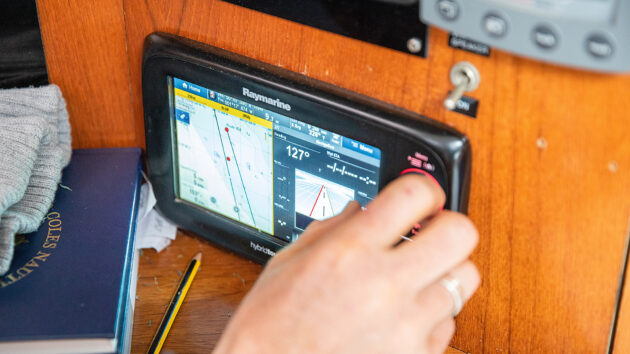
Many MFDs are internet-enabled, so waypoints, routes and other data from handheld devices can be transferred to the boat’s fixed chartplotter. Photo: Richard Langdon.
At the 2025 Southampton Boat Show, I interviewed several electronic navigation sellers about how to get the most out of using a chartplotter.
One I spoke to was scathing: “People only use a fraction of the features,” adding that a lack of basic navigational knowledge was often the biggest problem, listing the following examples:
- Failure to update charts: Correcting paper charts is a laborious task, but chartplotters without internet access can also be difficult to update. Internet-enabled chartplotters are the easiest of all to manage on that front.
- Speed over ground (SOG) vs speed through the water: Your log might be showing 2 knots, but if you don’t keep an eye on SOG, you might not notice that a strong tidal current is actually pushing you backwards, sideways or even forwards, which could bring you on to a nav hazard you’re simply not prepared for.
- Course to steer (CTS): Dayskipper students are taught all the variables that go into calculating an accurate course to steer (CTS): magnetic deviation and variation, plus the effects of tide and wind for every hour of the voyage being planned. If you’re using your GPS’s waypoints and routing capabilities, the cross-track error will indicate whether you’re steering to the wrong heading, but without knowing that the tide will change every hour, a long journey could get very complicated indeed.
- Depth vs draught: If you’re going to use autoroute or safety alerts, the chartplotter needs to know how deep your keel is, but at the same time you need to be aware that the depths on the chart are below the waterline at LAT (lowest astronomical tide).
Top takeaways for getting the most from your chartplotter
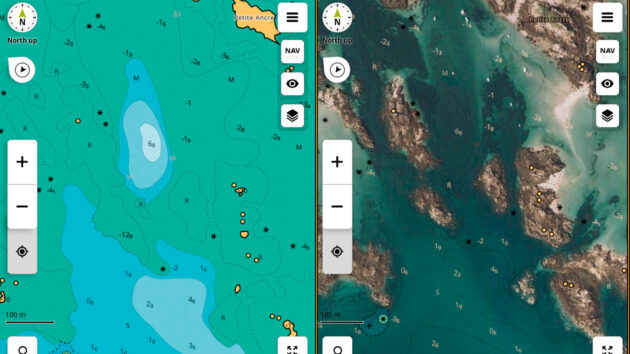
The chart image (left) is instantly clarified by the satellite photo overlay (right), plus it shows you where the nice beaches are.
- Reducing screen brightness at night can lead to screens that are too dark to use the next morning, which means it’s impossible to find the settings menu that adjusts the brightness! B&G developed a shortcut to resetting screen brightness (two presses on the start button) after repeated customer queries. Some modern vessels, like Axopar, have brightness adjusters on the throttle handles; If all else fails, try viewing the screen through a phone camera – the lens can pick up extra brightness, helping you locate the essential controls.
- Make your ‘own boat location’ icon as small as possible so as not to block out important nearby nav marks on the chart.
- Make a list of acronyms – there are so many!
Some are model specific:
- Garmin experts at the boat show recommend always making the most of your DSC VHF radio and its connection to the MFD. Specifically, the ability to tap on an AIS target and use its MMSI number to open a direct radio channel for communication.
- Raymarine camera integration: infra-red heat detection devices, especially in the engine room showing which parts of the engine are hottest.
- Raymarine Doppler radar has smart features such as different coloured targets: green targets are stationary or moving away, while red targets are more of an immediate danger.
- B&G transparency: when you layer satellite imagery over the top of chart imagery you can adjust the blend of the two, so the useful elements of the chart shine through the useful photography. This can quickly make sense of complicated rocky charts, but it also shows you where the nice beaches are at a glance – essential info for family cruisers.
- Raymarine Maretron & Yachtsense; Garmin Empirbus – if you want the ability to switch on nav lights, monitor batteries and monitor tank levels and engine data from your MFD.
- Garmin chartplotters and the satellite communication device inReach are intercompatible, meaning you can send quick ‘check in’ messages, and initiate SOS alerts directly from the chartplotter screen.
- Garmin Quatix watches can connect to the chartplotter and the autopilot, functioning as a wearable remote control for steering and routing.
- And how about voice control for routing and steering… what could possibly go wrong there
Start dreaming today: appchart.bandg.com • appchart.c-map.com • appcharts.simrad-yachting.com • appcharts.lowrance.com • activecaptain.garmin.com.
Want to read more articles about using your chartplotter?

A subscription to Practical Boat Owner magazine costs around 40% less than the cover price.
Print and digital editions are available through Magazines Direct – where you can also find the latest deals.
PBO is packed with information to help you get the most from boat ownership – whether sail or power.
-
-
-
- Take your DIY skills to the next level with trusted advice on boat maintenance and repairs
- Impartial, in-depth gear reviews
- Practical cruising tips for making the most of your time afloat
-
-
Follow us on Facebook, Instagram, TikTok and Twitter